ZENONIA 1 Controls
Keyboard, controller, and the restored double-tap dash on the Steam build.
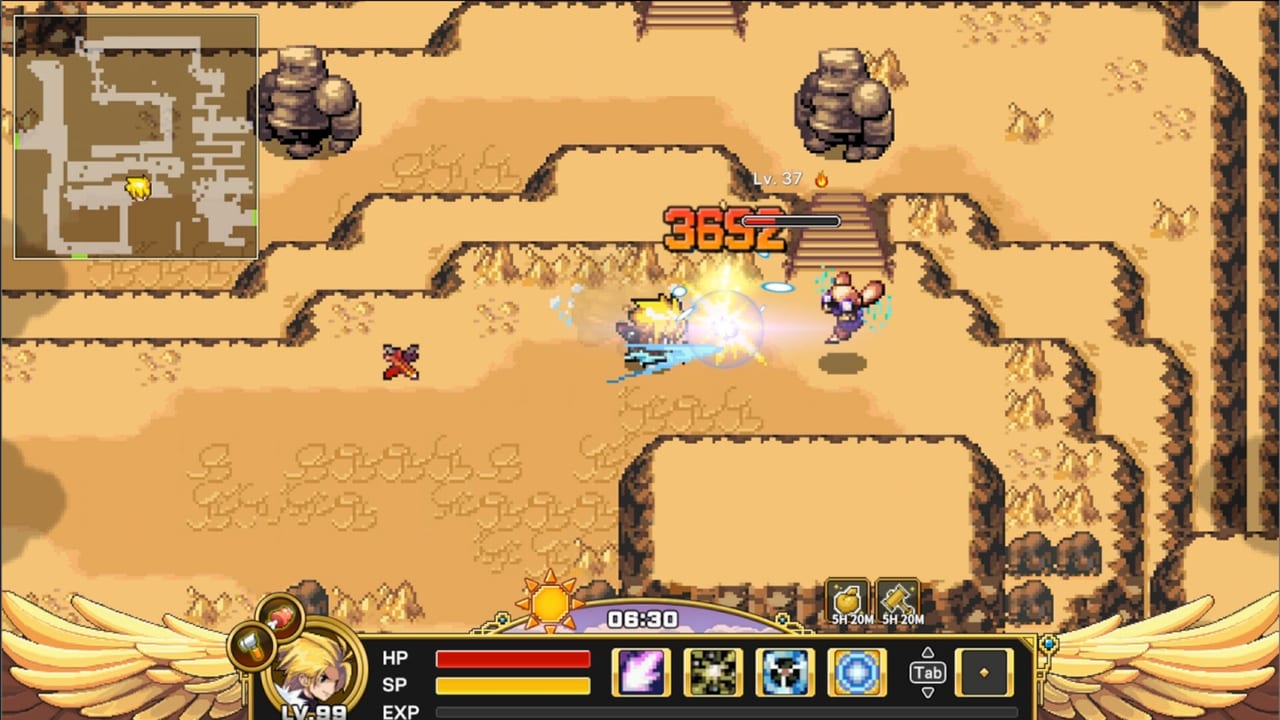
The original ZENONIA lived on a thumb and a translucent d-pad. The Steam restoration is built for a keyboard, a mouse, and a full controller. That is the largest play-feel change in the project, and it is also the place new players get lost: the HUD shows Z, X, C, V, Tab, Shift, and a clock, while veterans still look for a virtual stick. This page is the input sheet. Pair it with Getting Started if you have not left Ayles yet.
Com2us Holdings and CFK said they spent restoration time on input responsiveness, UI readability, and play flow. After the Steam Next Fest demo, they put the original-style dash back: tap a direction twice to dash, with the afterimage longtime players remembered. If the game feels sticky, you are probably walking when the old muscle memory wants a dash.
Keyboard and mouse
Movement is WASD or the arrow keys depending on your layout. Attack is the primary action key shown on the HUD. Skills sit on Z, X, C, and V in the captured Steam HUD — those slots fill as you unlock the class tree. Tab opens inventory and character screens. Shift is used for the item shortcut shown next to the potion stack. Esc opens the menu. Space skips some voiced or staged scenes (the skip prompt appears in the corner of story shots).
Mouse movement is not a click-to-move Diablo pointer. Treat the mouse as camera-adjacent UI: click menus, compare gear, and confirm shop stacks. Combat is still directional. If you came from a click-to-move ARPG, spend ten minutes in the Ayles fields until your hands stop clicking the ground.
The Steam page lists a keyboard-only option in accessibility. You can play without a mouse for combat; you still want a mouse or D-pad for inventory sorting because weight management is fiddly on a single key.
Controller
Full controller support is on the Steam feature list, including Xbox controllers. Face buttons map to attack and skills, bumpers or triggers handle shortcuts, and the left stick is movement. The double-tap dash works on the stick as a quick flick in one direction twice. Do not hold the stick and expect an auto-dash — it is still a tap language, the same idea as the old phone d-pad.
If you play on a large TV, bump UI scale in settings. The restoration redesigned damage numbers, hit effects, and targeting indicators so combat reads on a monitor. It still helps to sit closer than a living-room couch until you learn enemy wind-ups.
Dash, lock, and combat rhythm
ZENONIA 1 combat is spacing plus skill timing. You walk into range, swing, dash out of a slime jump, then spend SP on a class skill. Assassin wants the dash more often. Paladin can eat a hit and answer. Warrior lives in the middle. Whatever you picked, dash is not optional on the Steam build — the team called it out as a sensory detail players remembered more clearly than the plot.
Do not dash into walls in caves. The Cave of Deceit and later seals punish panic dashes into traps, especially on the Seal of Greed, which is trap-heavy and light on a traditional boss. Read the bosses guide for fight-specific movement, and the walkthrough for when each cave opens.
HUD elements you should actually watch
The gold-winged bar along the bottom is the Steam HUD: portrait, HP, SP, EXP, skill slots, a sun/moon clock, and shortcut items. Hunger is easy to miss until Regret suddenly hits like wet paper. Weight is easy to miss until the dash feels late. Both are explained in hunger and weight. The minimap in the corner is your overworld friend; caves still need the map page because some rooms hide stairs behind lookalike walls.
The clock is not decoration. Day and night change which monsters wander and how some NPCs behave. If a shopkeeper is gone, check the time before you assume a bug.
Settings worth opening before Adonis
The restoration added detailed audio sliders, quick save, equipment comparison, batch equipment repair, and cleaner shop controls. Turn on comparison before you vendor a sword. Bind dash to a key you can mash without losing WASD. If you use a controller, confirm the stick dash in a safe field, not in a boss room.
Quick save is the PC safety net the phone version did not give you for free. Use it before a seal, before a long cave, and before an alignment dialogue you might regret. It is not a substitute for town repairs.
Common input mistakes
New players treat skill slots as consumable hotkeys and forget they spend SP. Empty SP in a cave with no food is how runs die. Returning players hunt for a virtual d-pad overlay that is not there. Demo players sometimes miss the double-tap dash because an early demo build did not match the original feel — the full version puts it back. If your copy still feels wrong, check the in-game help and the PC changes page for the post-demo notes.
Once movement is comfortable, go back to Getting Started for the Ayles shopping list, or skip to the demo guide if you are only testing Adonis. Class pages assume you already know how to dash: Warrior, Paladin, Assassin.
Frequently Asked Questions
Quick answers for new and returning adventurers.
Does ZENONIA 1 support a controller on Steam?
Yes. Steam lists full controller support, including Xbox controllers. Keyboard-only is also listed under accessibility.
How do I dash?
Tap a direction twice. The team restored that original dash and the afterimage after Next Fest feedback. Details are in this guide and PC changes.
What do Z, X, C, and V do?
They are skill slots on the Steam HUD. Fill them from your class tree as you level. Combat flow is covered here; skill priorities live on the builds page.
Can I remapped every key?
Open Settings after the title screen. Confirm dash and inventory first. Then return to Getting Started for the Ayles route.